

Overview
Obsidian plugin to manage and export markdown content.
It transforms Obsidian notes into publish-ready content with frontmatter processing, attachment management, and LLM-powered content generation.
In my case, I used it to manage and export content for my Astro blog directly from Obsidian.
| Plugin Settings | Export Preview |
|---|---|
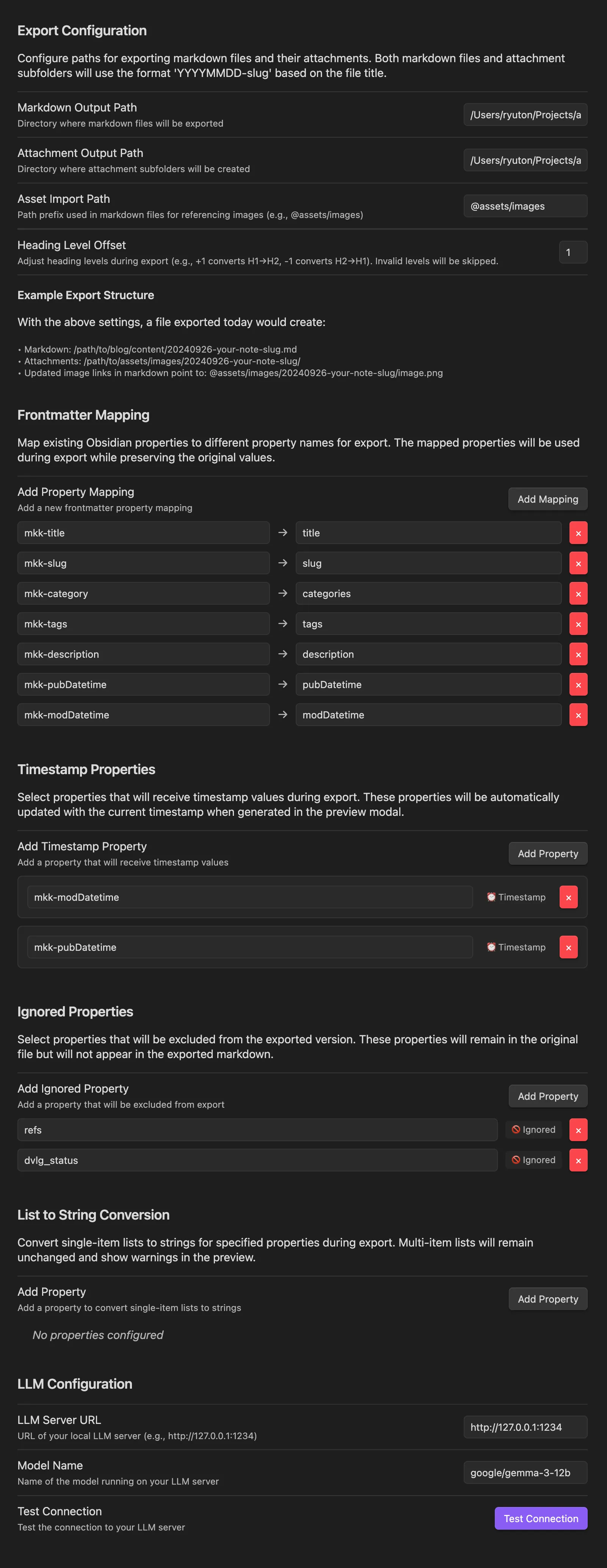 | 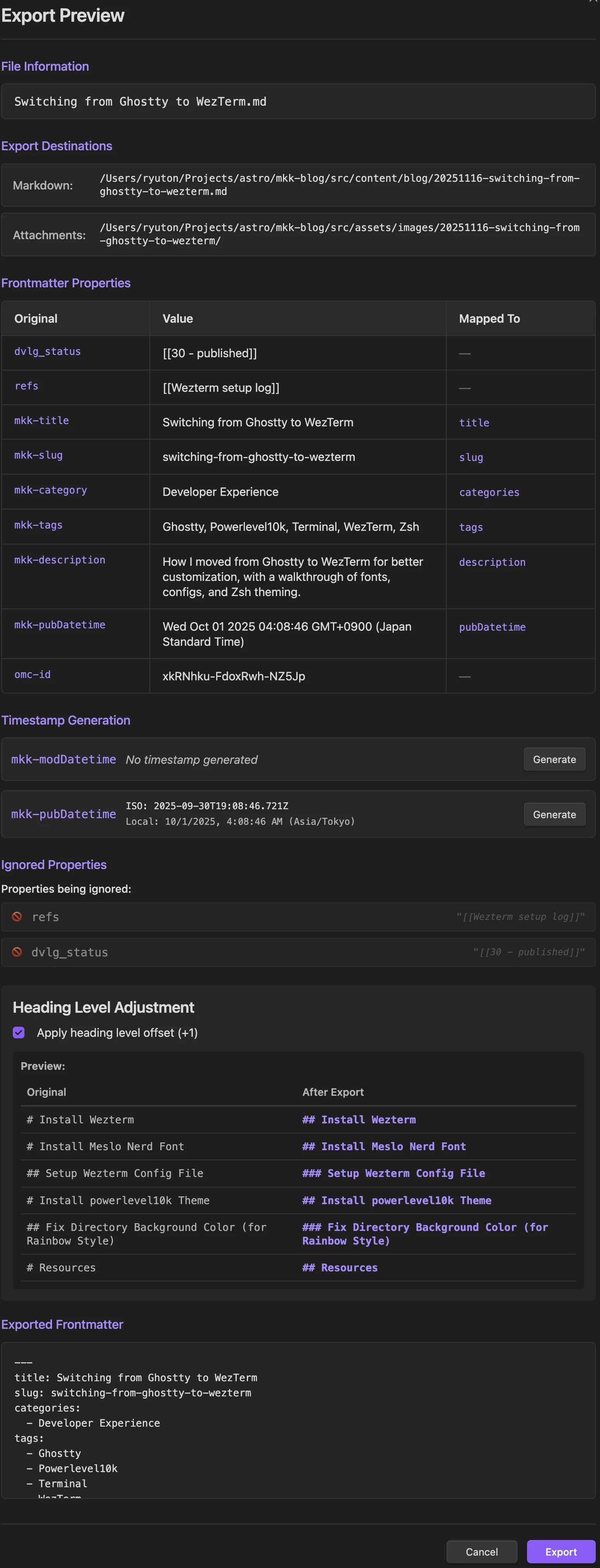 |
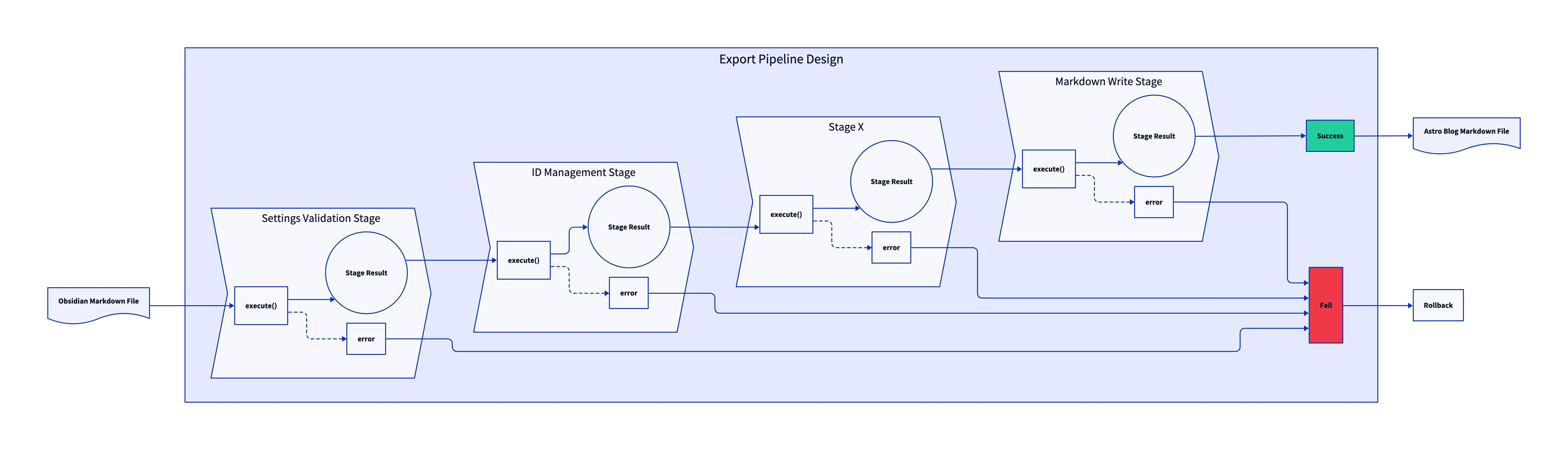
Diagram of Export Function Design with Pipeline Pattern
Tech Stack
Language / Framework
| Obsidian API | Core plugin framework for integrating with Obsidian |
| TypeScript | Primary language for type safety and better development experience |
Build & Development Tools
| pnpm | Package manager for efficient dependency handling |
| Vitest | Testing framework |
| ESLint | Code linting |
| Prettier | Code formatting |
| Husky | Git hooks for code quality |
GenAI Integration
| ChatGPT-compatible API Support | Flexible LLM integration supporting OpenAI-compatible endpoints |
| Content Generation | Intelligent slug and title generation using configurable LLM endpoints with multiple content styles |
Design Patterns
| Pipeline Pattern | For export processing with stages and rollback |
| Adapter Pattern | For file system abstraction |
| Command Pattern | For export operations |
Core Architecture Component: Pipeline Pattern
Achieved complicated sequential processing with “Pipeline Pattern” that provides transactional safety and atomic operations for the entire export workflow.
The implementation ensures that each stage can either complete successfully or roll back completely, maintaining system integrity even during complex multi-stage operations.
Benefits
| Modular Design | Each stage is independently testable and replaceable, allowing for easy maintenance and extension of the export workflow without affecting other components. |
| Transaction Safety | Complete rollback capability prevents partial exports and data corruption by tracking all created resources and automatically cleaning them up if any stage fails. |
Pipeline Pattern Overview
The pipeline pattern works by executing a series of discrete processing stages in sequence, where each stage performs a specific transformation or validation step.
The pipeline engine maintains a shared context that passes data between stages, while tracking all created resources (files and directories) for potential rollback. If any stage fails, the pipeline automatically reverses all completed stages in reverse order, ensuring the system returns to its original state.
This approach guarantees atomic operations - either the entire export succeeds completely or fails without leaving partial changes.
Technical Implementation Details
Interface Design
export interface ExportResult {
  success: boolean;
  message: string;
  exportedPaths?: { markdown: string; attachments: string };
}

export interface StageResult {
  data: Map<string, any>;
  createdFiles: string[];
  createdDirectories: string[];
}

export interface ExportStage {
  execute(context: ExportContext, result: StageResult): Promise<StageResult>;
  rollback?(context: ExportContext, result: StageResult): Promise<void>;
}

export interface ExportCommand {
  execute(): Promise<ExportResult>;
}ExportInterfaces.tsExportInterfaces.ts
Stage Implementation Example
class SettingsValidationStage implements ExportStage {
  async execute(
    context: ExportContext,
    result: StageResult
  ): Promise<StageResult> {
    if (
      !context.settings.markdownOutputPath ||
      !context.settings.attachmentOutputPath
    ) {
      throw new ExportError(
        ExportErrorCode.SETTINGS_INVALID,
        "Invalid configuration"
      );
    }
    return result;
  }
}SettingsValidationStage.tsSettingsValidationStage.ts
Stages Flow
| Stage | Responsibility |
|---|---|
| 1. Setting Validation | Validates export configuration including output paths and required settings. Throws error if configuration is incomplete. |
| 2. ID Management | Generates or retrieves unique OMC (Obsidian Markdown CMS) identifiers for content tracking and duplicate detection. |
| 3. Duplicate Detection | Checks for existing exports using OMC ID and prompts user for confirmation on updates. |
| 4. Content Processing | Transforms markdown content including frontmatter mapping, property filtering, heading adjustment, and list-to-string conversion. |
| 5. Path Generation | Calculates output file paths and attachment directories based on settings and content metadata. |
| 6. Directory Setup | Creates necessary directory structure and tracks them for potential rollback. |
| 7. Attachment Processing | Copies and processes embedded attachments, updating markdown references accordingly. |
| 8. Markdown Writing | Writes the final processed content to the target location with transaction tracking. |
Pipeline Assembly
this.pipeline = new ExportPipeline()
  .addStage(new SettingsValidationStage())
  .addStage(new OmcIdStage(omcIdManager))
  .addStage(new DuplicateDetectionStage(omcIdManager, confirmationService))
  .addStage(new ContentProcessingStage(vault, markdownProcessor))
  .addStage(new PathGenerationStage(pathResolver))
  .addStage(new DirectorySetupStage(fileSystem, transactionService))
  .addStage(
    new AttachmentProcessingStage(attachmentProcessor, transactionService)
  )
  .addStage(new MarkdownWriteStage(fileSystem, transactionService));ExportService.tsExportService.ts
Pain Point in Obsidian Plugin Development: Hot Reload
To streamline the development process, I implemented a hot reload mechanism that integrates with the pjeby/hot-reload Obsidian plugin.
| Hot Reload Support | Automatically reloads the plugin when changes are detected in the installed directory |
| Automated Copy | Custom script to sync build artifacts to the local Obsidian vault |
How Hot Reload Works
Created a custom script scripts/copy-plugin.js that:
- Reads
PLUGIN_PATHfrom.env(path to the local Obsidian vault’s plugin directory). - Copies built artifacts (
main.js,manifest.json,styles.css). - Creates a
.hotreloadfile (which is watched by the Hot Reload plugin) if it doesn’t exist. - Installs the Hot Reload plugin on your local Obsidian vault if it’s not already installed.
The .hotreload file is the signal for the Hot Reload plugin to watch the directory and reload automatically.