
Overview
A multi-tenant B2B2C rehabilitation platform built with FastAPI and Python, implementing Clean Architecture.
It powers both the patient mobile app and the therapist dashboard, ensuring data consistency and secure access control across different hospitals.
Tech Stack
| Technology | Category | Description |
|---|---|---|
| Python 3.9+ | Language | Chosen for its rich ecosystem in data science and web development. |
| FastAPI | Framework | High-performance, easy-to-learn, and fast-to-code web framework. |
| MySQL 8.0 | Database | Primary relational database for structured patient and training data. |
| Firestore | NoSQL | Used for real-time features (Chat, Notifications) and mobile sync. |
| SQLAlchemy | ORM | Powerful ORM for database interactions. |
| Pydantic | Validation | Data validation and settings management using Python type hints. |
| Celery | Async Tasks | Handling background tasks like video processing and notifications. |
| Alembic | Migrations | Database schema migrations. |
| Terraform | Infrastructure | Infrastructure as Code for AWS resources. |
Infrastructure
The infrastructure is fully managed via Terraform on AWS.
- Compute: ECS Fargate for running the API and Worker containers.
- Database: Amazon RDS (MySQL).
- Storage: S3 for storing training videos and assets.
- Networking: VPC with public/private subnets and ALBs.
Architecture: Clean Architecture
The backend strictly follows Clean Architecture principles to ensure separation of concerns and testability. The codebase is organized into distinct layers, with dependencies pointing inwards.
Key Layer Breakdown
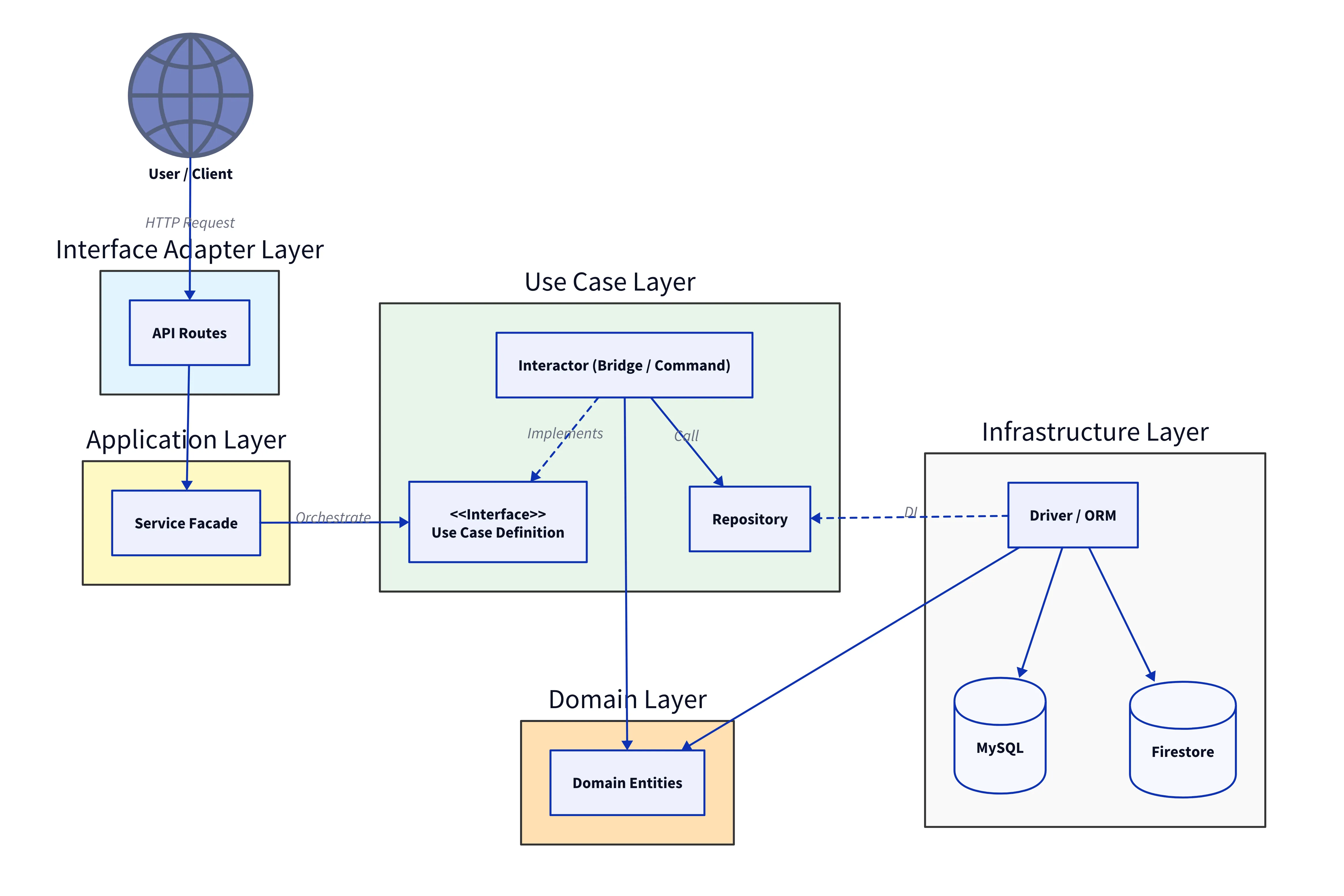
| Layer | Directory | Role | Responsibility |
|---|---|---|---|
| API Routes | src/routes | Interface Adapter (Port Layer in Hexagonal Architecture) | Handles HTTP requests, validates input using Pydantic schemas, and calls Services. |
| Service | src/service | Application Layer (Application Service in DDD) | Orchestrates the business logic by coordinating multiple Interactors. Acts as a facade. |
| Interactor | src/implement/interactor | Use Cases (Use Case Layer in Hexagonal Architecture) | Implements the Command Pattern to encapsulate business logic. Acts as a Bridge between abstract interfaces and concrete infrastructure. |
| Domain Entities | src/domain | Enterprise Business Rules (Domain Layer in DDD) | Defines core entities and business rules independent of external frameworks. |
| Driver | src/driver | Infrastructure (Port Layer in Hexagonal Architecture) | Implements details like Database access (SQLAlchemy models), Firebase communication, and external API calls. |
Example Flow: User Creation
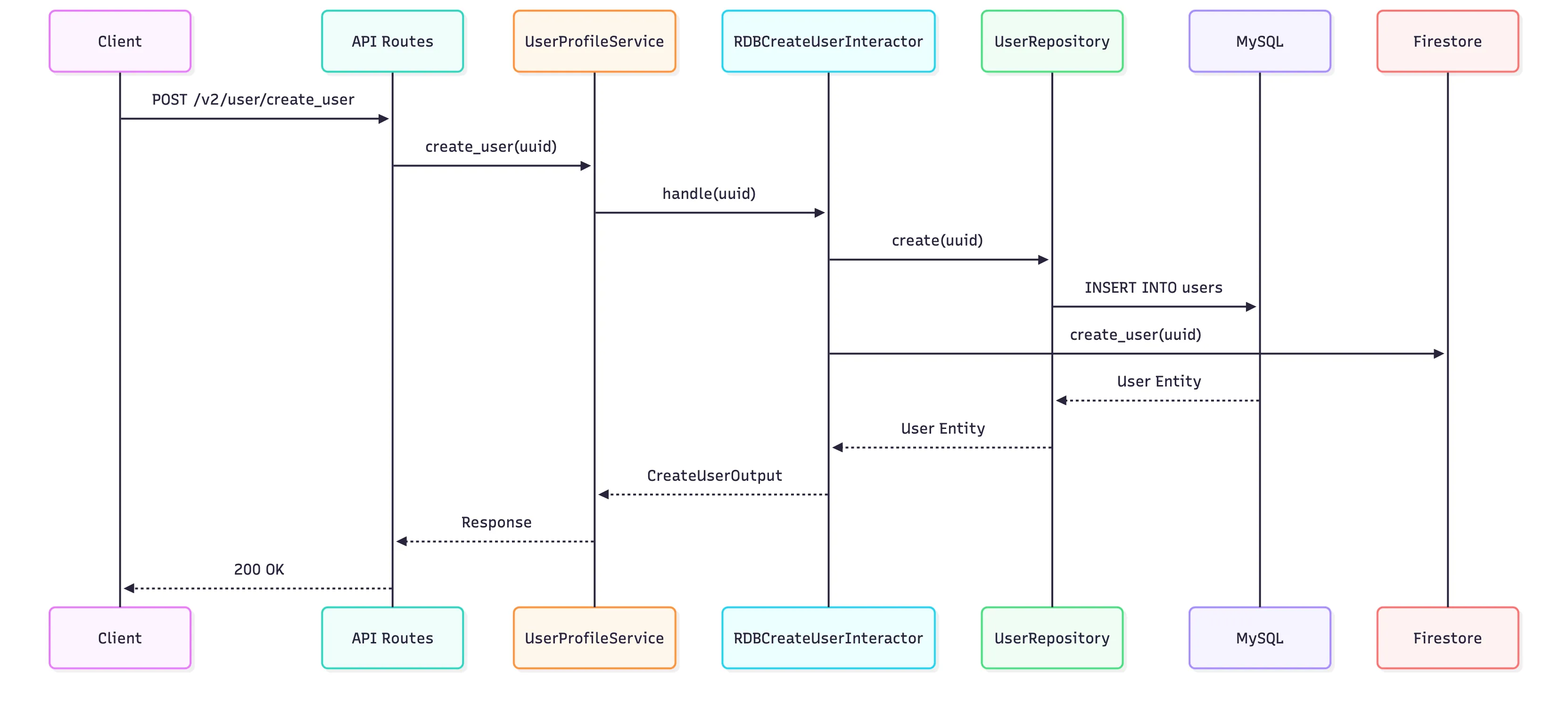
Here is how the code looks at each layer for creating a user.
1. API Route (Interface Adapter)
Handles the HTTP request and delegates to the Service.
@user_router.post("/create_user")
async def create_user(
    request: Request,
    db: Session = Depends(MySQL.get_session),
    info_token: dict = Depends(decoded_token),
):
    user_profile_service = UserProfileService(
        get_user_by_auth_id_usecase=RDBGetUserByAuthIdInteractor(),
        create_user_usecase=CreateUserInteractor(),
        send_welcome_email_usecase=SendWelcomeEmailInteractor(),
    )
    try:
        result = user_profile_service.create_user(
            db=db, auth_id=info_token["uid"]
        )
        new_user_id = result.id
    except UserAlreadyExistsException:
        raise HTTPException(status_code=409, detail="User already exists")

    return {"user": {"id": new_user_id}}src/routes/v2/user.pysrc/routes/v2/user.py
2. Service (Application Layer)
Orchestrates the flow. It acts as a facade, coordinating multiple Interactors.
class UserProfileService:
    def __init__(
        self,
        create_user_usecase: ICreateUserUsecase = None,
        get_user_by_auth_id_usecase: IGetUserByAuthIdUsecase = None,
        send_welcome_email_usecase: ISendWelcomeEmailUsecase = None,
    ) -> None:
        self.create_user_usecase = create_user_usecase
        self.get_user_by_auth_id_usecase = get_user_by_auth_id_usecase
        self.send_welcome_email_usecase = send_welcome_email_usecase

    def create_user(self, db: Session, auth_id: str) -> CreateUserOutput:
        # 1. Check if user already exists
        if self.get_user_by_auth_id_usecase.handle(db, GetUserByAuthIdInputData(auth_id=auth_id)):
            raise UserAlreadyExistsException()

        input_data = CreateUserInput(auth_id=auth_id)

        # 2. Create User
        result = self.create_user_usecase.handle(db, input_data)

        # 3. Send Welcome Email
        self.send_welcome_email_usecase.handle(email=result.email)

        return resultsrc/service/user/profile_service.pysrc/service/user/profile_service.py
The Service layer acts as a Facade for Orchestration and groups related atomic Use Cases into a single flow, preventing business logic from leaking into the Controller.
Without Service (Leaky Logic in Controller):
@router.post("/users")
def create_user(
    create_usecase: CreateUserInteractor = Depends(),
    email_usecase: SendWelcomeEmailInteractor = Depends(), # Logic leaks here
):
    user = create_usecase.handle(...)
    email_usecase.handle(user.email) # Controller is doing business logic!
With Service (Clean Orchestration):
@router.post("/users")
def create_user(
    service: UserProfileService = Depends(),
):
    service.register_user(...) # Service handles both creation and email
3. Interactor (Use Cases)
Contains the specific business logic for how to create a user. We use the Repository Pattern to abstract database access.
class CreateUserInteractor(ICreateUserUsecase):
    def __init__(
        self,
        user_repository: UserRepository = None,
        user_firestore_repository: UserFirestoreRepository = None
    ):
        self.user_repository = user_repository or UserRepository()
        self.user_firestore_repository = user_firestore_repository or UserFirestoreRepository()

    def handle(self, db: Session, input_data: CreateUserInput) -> CreateUserOutput:
        # 1. Create in MySQL (Transaction managed by Service/Controller)
        auth_id = input_data.auth_id
        user = self.user_repository.create(db, auth_id)

        # 2. Sync to Firestore via Repository
        self.user_firestore_repository.create(
            user_uuid=user.id,
            firebase_uuid=auth_id,
        )

        db.commit()
        return CreateUserOutput(id=user.id, auth_id=user.auth_id)src/implement/.../create_user_interactor.pysrc/implement/interactor/user/create_user_interactor.py
4. Domain Entity (Enterprise Business Rules)
Pure Python object defining what a “User” is.
class User:
    def __init__(
        self,
        id: str,
        auth_id: str,
        email: str,
        name: str,
        # ... other fields
    ):
        self.id = id
        self.auth_id = auth_id
        self.email = email
        self.name = name
        # ...src/domain/user.pysrc/domain/user.py
5. Driver (Infrastructure)
SQLAlchemy model mapping the Domain Entity to the MySQL table.
class User(Base):
    __tablename__ = "users"

    id = Column(String(6), primary_key=True)
    firebase_uuid = Column(String(48), nullable=True, unique=True)
    # ...src/driver/user.pysrc/driver/user.py
Key Implementation Details
Type Safety with Pydantic
We use Pydantic for robust data validation and settings management. It allows us to share data models between the API and the internal logic, ensuring type safety throughout the application and automatically generating OpenAPI documentation.
For example, when updating user registration info, we enforce email format validation and required fields using a simple class:
from pydantic import BaseModel, EmailStr

class UpdateRegisterInfoRequestBody(BaseModel):
    auth_email: EmailStr  # Automatically validates email format
    uuid: str
    invitation_id: Optional[str]src/schema/user.pysrc/schema/user.py
If a client sends an invalid email, FastAPI automatically returns a 422 Unprocessable Entity error with a clear message, without us writing a single line of validation logic.
Asynchronous Processing with Celery
To keep the API responsive, we offload heavy tasks like sending push notifications to background workers. We use Celery to manage these workers.
1. Configuration
First, we configure the Celery client and the message broker (Redis).
# Celery Configuration
client = Celery(__name__)
# The broker URL (e.g., redis://localhost:6379/0) is injected via environment variables
client.conf.broker_url = settings.celery_broker_uri
client.conf.result_backend = settings.celery_backend_uri
client.conf.imports = ["jobs.tasks.notification"]src/jobs/celery_app.pysrc/jobs/celery_app.py
2. Worker Implementation
The worker listens for tasks and executes the business logic.
@client.task
def push_notification_tasks(push_notification_id):
    # ... setup services ...

    # 1. Fetch notification info
    info = push_notification_service.get_push_notification_info(push_notification_id)

    # 2. Get target users
    users = user_profile_service.get_user_device_token_by_plan(info.target_user_plan)

    # 3. Send via Repository (Abstracts Firestore/SNS/etc.)
    push_notification_repository = PushNotificationRepository()
    push_notification_repository.send(
        title=info.title,
        message=info.message,
        device_tokens=users.device_tokens,
        plan_name=info.target_user_plan.name,
    )src/jobs/tasks/notification.pysrc/jobs/tasks/notification.py
3. Producer (Dispatch)
Finally, the API or Scheduler dispatches the task to the queue.
# Dispatch the task asynchronously
push_notification_tasks.apply_async(
    (notification_id,),
    eta=scheduled_time
)src/jobs/batch/schedule_notifications.pysrc/jobs/batch/schedule_notifications.py
Payment Integration with Stripe
We manage subscriptions by syncing Stripe data directly into our database. This allows us to query subscription status without hitting the Stripe API for every request.
class CheckUpdateUserBySubscriptionInteractor(ICheckUpdateUserBySubscriptionUsecase):
    # ... init ...

    async def handle(self, db: Session, input_data: CheckUpdateUserBySubscriptioInputData) -> ResultData:
        # 1. Get Plan and User info
        plan = self.plan_repository.find_by_product_id(db, input_data.product_id)
        if not plan: return ResultData(ok=False, error="Plan not found")

        user = self.user_repository.find_by_subscription_id(db, input_data.subscription_id)
        if not user: return ResultData(ok=False, error="User not found")

        # 2. Check if local data matches Stripe state
        user_hospital = self.user_tenant_repository.find(db, user.id, plan.hospital_id)
        if not user_hospital: return ResultData(ok=False, error="User not associated with hospital")

        # If IDs match, data is already consistent (Idempotent)
        if user_hospital.plan_id != plan.id:
            # 3. Sync local DB with new Plan
            self.user_tenant_repository.update(
                db=db,
                user_hospital=user_hospital,
                obj_in=UserHospitalUpdateData(
                    plan_id=plan.id,
                    purchase_status=PurchaseStatus.purchased,
                ),
            )
        return ResultData(ok=True)src/implement/interactor/.../subscription.pysrc/implement/interactor/user/rdb/subscription.py