
Overview
Spacy Explore is a mobile application designed to help users discover, track, and share interesting “spaces” (places) around them. Unlike traditional map apps, Spacy focuses on the user’s relationship with the space, distinguishing between places they have “Favorited” and places they have “Experienced”.
The application leverages Google Maps for exploration and a Graph Database (Neo4j) backend to efficiently model the complex relationships between users and spaces.
Tech Stack
| Technology | Category | Description |
|---|---|---|
| Flutter | Mobile | Cross-platform development for iOS and Android. |
| Ktor | Backend | Lightweight framework for Kotlin. |
| Kotlin | Backend | Modern, concise programming language used for backend logic. |
| Neo4j | Database | Graph database for modeling User-Space relationships. |
| PostgreSQL | Database | Relational database for storing normal application data. |
| gRPC | API Contract | Protocol Buffers used to define the strict API contract between client and server. |
| Riverpod | State Management | Robust and testable state management solution. |
| Google Maps SDK | Maps | Interactive map integration for space discovery. |
| Cloud Run | Infrastructure | Serverless platform for deploying the backend Docker container. |
Backend (Ktor + gRPC + Neo4j + PostgreSQL)
We built a robust backend using Ktor (Kotlin) that serves as the central hub for data. It aggregates structured data from PostgreSQL and relationship data from Neo4j, exposing a unified API via gRPC.
1. Directory Structure
backend/src/main/kotlin/com/spacy/api/
├── Application.kt       # Ktor Application Entry Point
├── GRpcEngine.kt        # gRPC Server Setup
├── SpaceServiceImpl.kt  # gRPC Service Implementation
├── SpaceRepository.kt   # Dual-Database Data Access
└── DatabaseFactory.kt   # DB Connection Management
2. gRPC Server Setup
We use a dedicated GRpcEngine to manage the gRPC server lifecycle, running in parallel with Ktor’s Netty engine.
object GRpcEngine {
    fun start(port: Int) {
        val server = ServerBuilder.forPort(port)
            .addService(SpaceServiceImpl())
            .build()
            .start()

        println("gRPC Server started, listening on $port")
    }
}backend/src/main/kotlin/com/.../GRpcEngine.ktbackend/src/main/kotlin/com/spacy/api/GRpcEngine.kt
3. Graph-Based Recommendation Engine
While basic user-space relationships (like “Favorited” or “Experienced”) are stored in PostgreSQL for efficient retrieval, we leverage Neo4j for what it does best: Recommendations.
We implemented two types of graph-based recommendations:
- Collaborative Filtering: “People who liked/experienced spaces you liked/experienced also…”
- Item-Based Recommendations: “People who liked/experienced this space also…“
class SpaceRepository {
    // 1. User State: Read from Postgres (Fast, Consistent)
    fun getAll(userId: String): List<Space> {
        return transaction {
            val favorites = Favorite.find { Favorite.userId eq userId }.map { it.spaceId }.toSet()
            val experiences = Experience.find { Experience.userId eq userId }.map { it.spaceId }.toSet()

            Spaces.selectAll().map { row ->
                // Construct Space with flags from Postgres sets
            }
        }
    }

    // 2. Discovery: Read from Neo4j (Graph Algorithms)
    fun getRecommendedSpaces(userId: String): List<Space> {
        // "People who liked/experienced what you liked/experienced..."
        val query = """
            MATCH (u:User {id: ${'$'}userId})-[:EXPERIENCED|FAVORITE]->(:Space)<-[:EXPERIENCED|FAVORITE]-(other:User)-[:EXPERIENCED|FAVORITE]->(rec:Space)
            WHERE NOT (u)-[:EXPERIENCED|FAVORITE]->(rec)
            RETURN rec.id, count(*) as score ORDER BY score DESC
        """
        val ids = executeCypher(query, mapOf("userId" to userId))
        return getSpacesByIds(ids, userId) // Fetches details from Postgres & merges flags
    }

    // 3. Related Spaces: "Similar to this space" (Weighted by User Similarity)
    fun getRelatedSpaces(spaceId: String, userId: String): List<Space> {
        val query = """
            MATCH (me:User {id: ${'$'}userId})
            MATCH (p:Space {id: ${'$'}spaceId})
            MATCH (p)<-[:EXPERIENCED|FAVORITE]-(other:User)-[:EXPERIENCED|FAVORITE]->(rec:Space)
            WHERE NOT (me)-[:EXPERIENCED|FAVORITE]->(rec)

            OPTIONAL MATCH (me)-[:EXPERIENCED|FAVORITE]->(shared:Space)<-[:EXPERIENCED|FAVORITE]-(other)
            WITH rec, other, count(shared) as similarity

            RETURN rec.id as spaceId, sum(similarity + 1) as score
            ORDER BY score DESC
            LIMIT 5
        """.trimIndent()

        val ids = executeCypher(query, mapOf("spaceId" to spaceId, "userId" to userId))
        return getSpacesByIds(ids, userId)
    }
}backend/src/main/kotlin/.../SpaceRepository.ktbackend/src/main/kotlin/com/spacy/api/SpaceRepository.kt
4. Graph-Based Data Modeling (Neo4j)
The core value of Spacy is discovery. By modeling users and spaces as nodes in a graph, we can traverse relationships to find hidden gems that similar users have enjoyed.
- Nodes:
User,Space - Relationships:
(:User)-[:EXPERIENCED]->(:Space),(:User)-[:FAVORITE]->(:Space)
This graph structure allows us to execute complex recommendation queries in milliseconds, which would be computationally expensive in a traditional relational database.
5. API Contract with gRPC & Protobuf
To ensure type safety and a clear contract between the Flutter mobile app and the Ktor backend, we defined the API using Protocol Buffers (protobuf).
service SpaceService {
  rpc GetAll (GetAllRequest) returns (GetAllResponse);
  rpc GetRecommended (GetRecommendedRequest) returns (GetRecommendedResponse);
  rpc GetRelated (GetRelatedRequest) returns (GetRelatedResponse);
}

message Space {
  string id = 1;
  string name = 2;
  double lat = 3;
  double lng = 4;
  string address = 5;
  string category = 6;
  string image_url = 7;

  // User-specific flags
  bool is_favorited = 9;
  bool is_experienced = 10;
}

message GetAllResponse {
  repeated Space spaces = 1;
}proto/space.protoproto/space.proto6. Proto File Management Strategy
We treat our Protobuf definitions as a versioned dependency, stored in a separate repository. This approach has several key advantages over co-locating proto files within service repositories:
- Avoids Circular Dependencies: If Service A and Service B both act as clients and servers to each other, maintaining their own proto files can lead to a circular upgrade loop. A separate repo breaks this cycle.
- Single Source of Truth: The proto repo acts as the definitive contract for all services.
- Language-Agnostic Generation: We can generate language-specific packages (e.g., a Dart package for Mobile, a Kotlin library for Backend) from this central repo, ensuring all clients are always in sync with the latest API definition.
This strategy is particularly crucial for gRPC, where maintaining backward compatibility and strict schema versioning is easier than with more relaxed REST/OpenAPI approaches.
While the mobile application currently consumes these endpoints via JSON/REST for flexibility with Flutter’s ecosystem, the Proto definitions serve as the single source of truth for the API structure, ensuring that both backend and frontend teams are aligned.
Flutter Mobile App
Directory Structure
lib/
├── view/
│   ├── screens/     # Screens (Pages) like Explore, Detail
│   └── widgets/     # Reusable Widgets
├── view_models/     # State Management (Riverpod Notifiers)
├── data/
│   ├── repositories/ # Repository Interfaces & Implementations
│   ├── models/       # Data Models
│   ├── remote/       # API Clients (Dio)
│   └── local/        # Local Storage
└── config/          # App Configuration
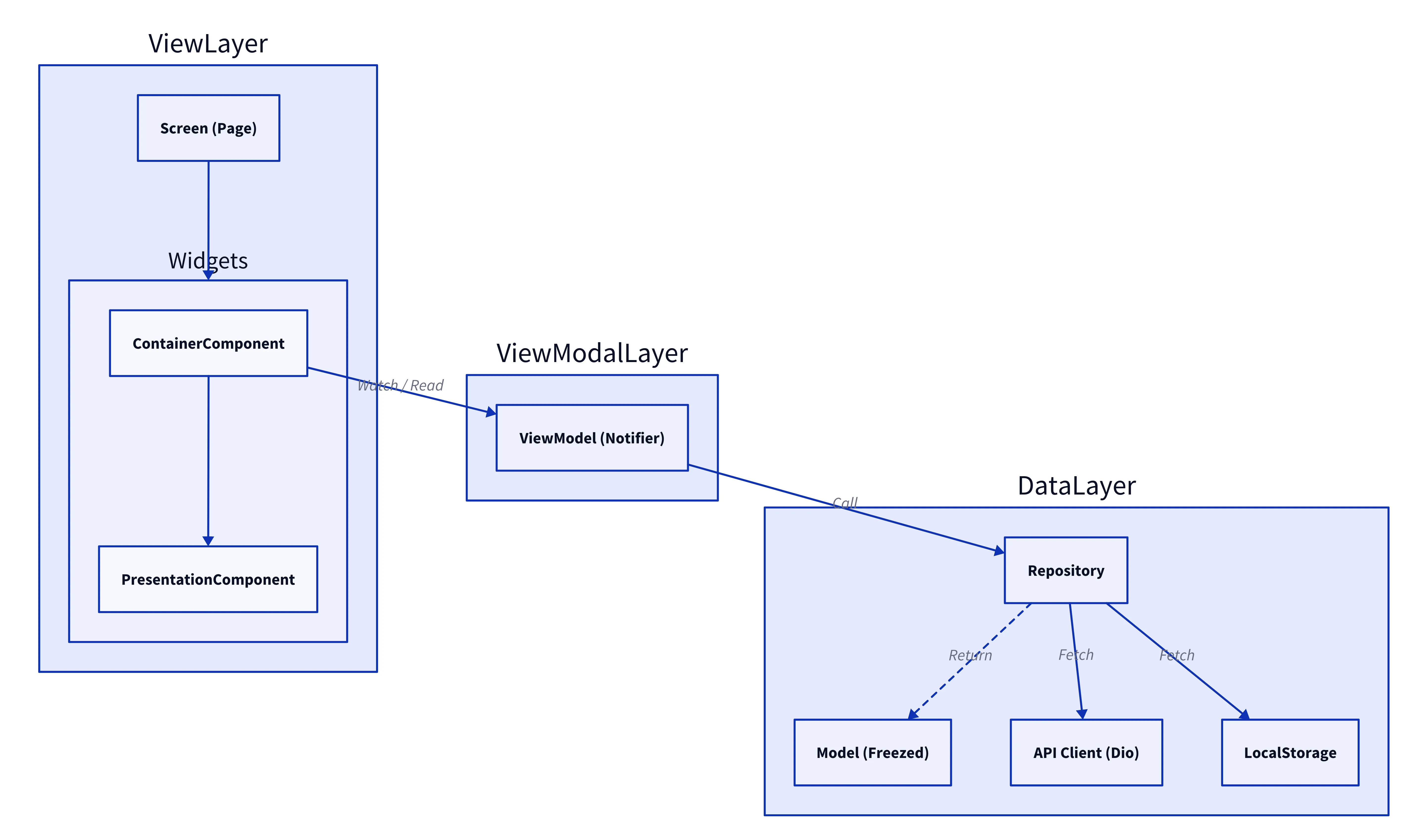
Architecture: MVVM + Repository Pattern
We adopted the MVVM (Model-View-ViewModel) pattern combined with the Repository Pattern to ensure a clean separation of concerns and testability, similar to our approach in the Apollo Rehabilitation App.
- View: Flutter Widgets that observe the ViewModel state.
- ViewModel (Notifier): Manages UI state and business logic using Riverpod.
- Repository: Abstracts data sources and provides a clean interface for the ViewModel.
- Model: Data classes reflecting the domain entities.
Component Design Pattern
We strictly separate Container Components (logic/state) from Presentation Components (UI/rendering), a pattern we evolved in CrowdLinks and Apollo.
- Container (C): Connects to Riverpod, handles business logic, and passes data to Presentation components. (e.g.,
CCarousel) - Presentation (P): Pure UI components that receive data via constructor arguments. (e.g.,
PCarousel)
class CCarousel extends HookConsumerWidget {
  @override
  Widget build(BuildContext context, WidgetRef ref) {
    // 1. Connect to State
    final mapSpacesState = ref.watch(mapSpacesNotifierProvider);

    return mapSpacesState.when(
      data: (state) => PCarousel( // 2. Pass to Presentation
        carouselItems: state.carouselItems,
        onPageChanged: (index, reason) {
           // 3. Handle Logic
           ref.read(mapSpacesNotifierProvider.notifier).moveMapTo(index, reason);
        },
      ),
      // ...
    );
  }
}lib/view/widgets/explore/c_carousel.dartlib/view/widgets/explore/c_carousel.dart
State Management with Riverpod
We use Riverpod to manage the state of the map and the spaces being displayed. The MapSpacesNotifier handles fetching spaces based on the user’s location and filters.
final mapSpacesProvider = StateNotifierProvider.autoDispose<MapSpacesNotifier, AsyncValue<List<Space>>>((ref) {
  return MapSpacesNotifier(ref.read(spaceRepositoryProvider));
});

class MapSpacesNotifier extends StateNotifier<AsyncValue<List<Space>>> {
  MapSpacesNotifier(this._repository) : super(const AsyncValue.loading()) {
    fetchSpaces();
  }

  final SpaceRepository _repository;

  Future<void> fetchSpaces() async {
    try {
      state = const AsyncValue.loading();
      final spaces = await _repository.findByUserId("current_user_id");
      state = AsyncValue.data(spaces);
    } catch (e, st) {
      state = AsyncValue.error(e, st);
    }
  }
}lib/view_models/map_spaces_notifier.dartlib/view_models/map_spaces_notifier.dart
Repository Pattern Implementation
The repository pattern abstracts the API calls. The implementation uses a gRPC Client to communicate with the Ktor backend.
class SpaceRepository {
  late final SpaceServiceClient _client;

  SpaceRepository(this._ref) {
    const host = String.fromEnvironment('GRPC_HOST', defaultValue: 'localhost');
    const port = int.fromEnvironment('GRPC_PORT', defaultValue: 50051);

    final channel = ClientChannel(
      host,
      port: port,
      options: const ChannelOptions(credentials: ChannelCredentials.insecure()),
    );
    _client = SpaceServiceClient(channel);
  }

  Future<List<Space>> getSpaces() async {
    final request = GetAllRequest(userId: 'user-123'); // Mock User ID
    final response = await _client.getAll(request);

    return response.spaces.map((s) => Space(
      id: s.id,
      name: s.name,
      lat: s.lat,
      lng: s.lng,
      address: s.address,
      category: s.category,
      imageUrl: s.imageUrl,

      isFavorited: s.isFavorited,
      isExperienced: s.isExperienced,
    )).toList();
  }
}lib/data/repositories/space_repository.dartlib/data/repositories/space_repository.dart
Google Maps Integration
The ExploreScreen integrates GoogleMap to visualize the spaces. Markers are dynamically generated based on the list of spaces in the MapSpacesNotifier state.
class ExploreScreen extends HookConsumerWidget {
  @override
  Widget build(BuildContext context, WidgetRef ref) {
    final spacesState = ref.watch(mapSpacesProvider);

    return Scaffold(
      body: spacesState.when(
        data: (spaces) => GoogleMap(
          initialCameraPosition: _kTokyoStation,
          markers: spaces.map((space) => Marker(
            markerId: MarkerId(space.id),
            position: LatLng(space.lat, space.lng),
            infoWindow: InfoWindow(title: space.name),
          )).toSet(),
        ),
        loading: () => const Center(child: CircularProgressIndicator()),
        error: (e, _) => CommonErrorWidget(
          error: e,
          onRetry: () => ref.refresh(mapSpacesProvider),
        ),
      ),
    );
  }
}lib/view/screens/explore_screen.dartlib/view/screens/explore_screen.dart